
A restore test should end with a business check
Plan a recovery rehearsal that checks data, dependencies and a useful workflow—not simply a successful backup console message.
Read article : A restore test should end with a business check

RANSOM SECURE / BACKUP READINESS CHECKLIST
Review the copies, boundaries, access and restoration tests your business depends on when normal operations stop.
START WITH THE OUTCOME
Backup readiness is the ability to use the right copies, access and procedures to restore an agreed business service. It includes the data you protect, the infrastructure that holds it and the people who must operate the recovery process.
A dashboard may show that jobs completed successfully while recovery dependencies remain untested. Use this review to connect the backup arrangement to the business workflow it is intended to support.
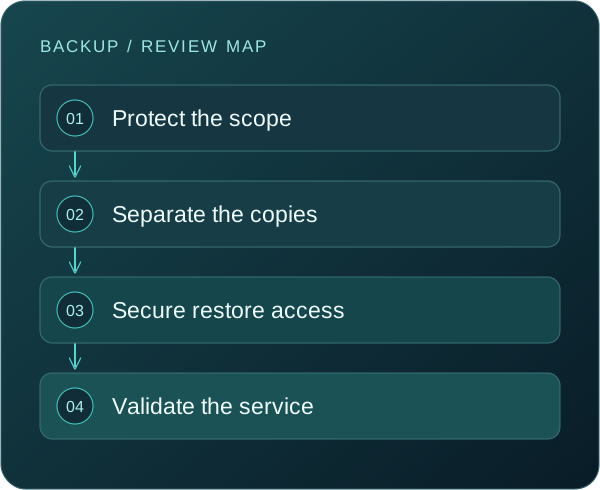
FOUR LAYERS OF RECOVERY CONFIDENCE

Identify the applications, files, settings and SaaS data required by the service. Confirm what is excluded and who owns each gap. A vendor’s availability commitment does not automatically match your retention or recovery requirements.

Review how protected copies are isolated from ordinary production access. Consider administrator credentials, deletion permissions, retention settings and the ability of a compromised account to affect several copies at once.

Identify the accounts, keys, documentation and network access needed to restore. Make sure authorized responders can reach them through an agreed process when ordinary identity or collaboration services are unavailable.

Restore into an appropriate test environment and confirm the workflow with its owner. Measure the usable recovery point, elapsed time and missing dependencies. A file that opens is not the same as a complete service that works.
THE READINESS WORKBOOK
Mark items reviewed, then keep evidence and actions in your approved internal records. These selections are local to this page and are not a security score.
TEST THE ARRANGEMENT AGAINST FAILURE
Review whether that identity can delete copies, alter retention or access the backup console. Separation should be demonstrated through actual permissions and recovery procedures rather than inferred from a different product name.
Identify how authorized people reach the backup platform and the systems needed to restore identity. Emergency access should be controlled, documented and tested without depending on the unavailable service.
A clean recovery point may be older than the latest backup. Review retention, the compromise timeline and the validation process with responders. The acceptable data-loss window and the available safe copy may differ.
Break down the elapsed time: access, infrastructure, data transfer, application recovery and business checks. Compare the evidence with the agreed recovery objective and assign improvements to the relevant dependency.
DESIGN A MEANINGFUL EXERCISE
01
Define the minimum service that must work and identify the owner who can judge it. Include a realistic data volume and the systems that support the activity.
02
Use an approved scope, environment and access plan. Define what must not affect production and how the exercise will stop if an unexpected issue appears.
03
Record the start point, recovery point and time to useful service. Check access, data consistency and the workflow itself. Keep the evidence that explains the result.
04
Separate technical improvements from business decisions about acceptable interruption. Assign owners and a retest date rather than marking the exercise complete while important findings remain open.
QUESTIONS THAT MATTER
Immutability can restrict alteration or deletion for a defined period, but its protection depends on configuration, access and the platform’s behavior. It does not prove that all required data is covered or that a usable service can be restored.
Replication supports another copy or environment, but it may also propagate unwanted changes. Review retention, recovery points and failure scenarios separately rather than assuming replication covers every recovery need.
Set a schedule based on criticality and change. Revisit tests after significant changes to systems, data volumes, access or providers. The important question is whether the evidence represents the environment you depend on today.
First understand the service’s retention and recovery capabilities, your contractual responsibilities and your business requirements. Then determine whether additional protection is needed for the data and scenarios in scope.
No. It records review progress. Verification requires access to evidence and appropriately planned restoration testing. A completed checklist cannot establish that a recovery point is clean or complete.
A high-level service inventory, current backup approach, known exceptions and recent test results. Arrange a suitable channel before sharing sensitive configuration or recovery information.
KEEP EXPLORING
Plan a recovery rehearsal that checks data, dependencies and a useful workflow—not simply a successful backup console message.
Read article : A restore test should end with a business checkA recent backup is a starting point. Check what it contains, what it depends on and whether it supports the service you need.
Read article : Before you restore: evaluate the recovery pointA practical way to connect people, service identities and integrations to the business information they can reach.
Read article : Cloud access reviews: follow the identity, not just the serverTURN INFORMATION INTO ACTION
Tell us what you want to protect, where the uncertainty is and who needs to be involved. We will discuss the scope and practical next steps with you.