
A restore test should end with a business check
Plan a recovery rehearsal that checks data, dependencies and a useful workflow—not simply a successful backup console message.
Read article : A restore test should end with a business check

RANSOM SECURE / GUIDES AND CHECKLISTS
Choose a focused guide, bring the right people together and turn the answers into a practical next step.
THE PRACTICAL LIBRARY
Search by topic or use case. Start with one guide and the people who can supply the evidence it asks for.
All guides are shown below.

Response / PRACTICAL RESOURCE
Structure the first decisions after a suspected incident. Clarify observations, communication, containment ownership and handover.

Recovery / PRACTICAL RESOURCE
Review coverage, isolation, recovery access and restoration evidence before relying on your backup arrangements.

AI / PRACTICAL RESOURCE
Review tools, data, permissions, human oversight and reporting routes before expanding an AI workflow.

Recovery / PRACTICAL RESOURCE
Record RTO, RPO, dependencies and test evidence for one business service. Download a working brief.

Identity / PRACTICAL RESOURCE
Understand sign-in controls, privilege, guest access and the account lifecycle with practical review questions.
BEFORE YOU OPEN A CHECKLIST
A broad question such as “Are our backups secure?” can produce several incompatible answers. A more useful review names the service, the systems it depends on and the failure scenario being considered.
Bring together the business owner and the people responsible for the controls. An outsourced platform does not remove the need to understand your own responsibilities, access arrangements and recovery options.
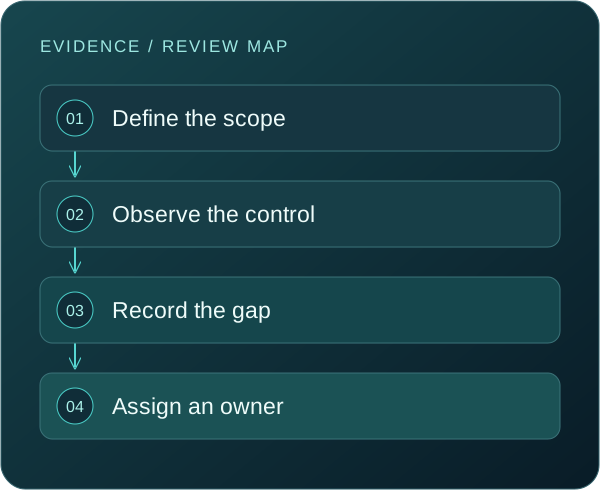
01
Choose a specific activity such as taking orders, accessing client files or approving a payment. Identify what must continue and who can define success.
02
Look for configuration records, permission lists, test outcomes and responsible owners. A product licence or policy document alone may not show how a control is operating.
03
Mark unknowns explicitly. Decide whether the next step is to collect evidence, test a process or obtain specialist advice. Do not turn an unknown into a positive answer.
WHAT A USEFUL REVIEW PRODUCES
The business or technical question you set out to answer, with a clear boundary around the service or workflow.
What was actually found, when it was checked and which evidence supports it. Separate observation from interpretation.
The agreed action or accepted exception, including who can approve it and what dependencies affect delivery.
A date or trigger for checking the outcome. A configuration change, new supplier or failed test may justify an earlier review.
WORKED EXAMPLE
A team reviewing order processing finds that the nightly backup reports success. That is useful evidence about a job, but it does not answer whether identity services, application settings and payment integrations can be restored in the required order.
The next action is a scoped restoration exercise with agreed acceptance checks. The record should state what was tested, the recovery point used, elapsed time and unresolved dependencies. The guide has helped the team move from a general claim to a testable question.
USE THE TOOLS RESPONSIBLY
The interactive checklists do not transmit their selections. Save a printed summary if needed, then keep evidence and sensitive working notes in your organization’s approved systems. Do not put passwords, tokens or customer data in the website enquiry form.
A review is a snapshot of a defined scope. New applications, changed permissions, suppliers, data volumes and staffing can alter its conclusions. Assign a review owner and record the event that should trigger another look.
QUESTIONS THAT MATTER
Choose the guide closest to the decision in front of you. For an active concern, use the first-hour checklist and your incident plan. For preparation, begin with a critical workflow and review its identity, backup or AI dependencies.
They can contribute technical evidence, but the business owner should remain involved. Recovery priorities, acceptable interruption and approval responsibilities are business decisions as well as technical questions.
No. Ticks record review progress. They do not inspect systems, test effectiveness or establish that the evidence is current. Record gaps and exceptions even when an item has been discussed.
Yes. Interactive checklist pages include a print action. Your browser can also save the print view as a PDF. Keep any resulting document in a location appropriate to its contents.
KEEP EXPLORING
Plan a recovery rehearsal that checks data, dependencies and a useful workflow—not simply a successful backup console message.
Read article : A restore test should end with a business checkFind out which AI tools touch your business information, who owns them, and what to review before access expands.
Read article : How to build an AI tool inventory your team can actually useA practical way to connect people, service identities and integrations to the business information they can reach.
Read article : Cloud access reviews: follow the identity, not just the serverTURN INFORMATION INTO ACTION
Tell us what you want to protect, where the uncertainty is and who needs to be involved. We will discuss the scope and practical next steps with you.