AI security starts with a specific use case. A writing assistant, a search tool connected to internal documents and an agent that can change records create different questions about information, permissions and oversight.
This checklist helps business and technical teams review those questions together. It covers the organization’s own use of AI and the need to recognize AI-assisted impersonation. It does not test a model or establish that a vendor’s service is secure.
CHOOSE THE WORKFLOW
Which type of AI
are you reviewing?
A tool that drafts or summarizes
Identify what people enter, upload or record. Review the exact account plan, retention settings and vendor terms. Define information that must stay out and who checks the result before it is used.
An assistant connected to internal knowledge
Map connected repositories and the permissions used to retrieve information. Test different user roles, restricted documents and removal of outdated sources. A convenient answer must not bypass the underlying access boundary.
An agent that can take actions
List the permitted tools and actions. Use narrow permissions, independent application-side authorization and explicit approval for consequential changes. Test the ability to stop execution and revoke access.
A PROMPT IS NOT AN ACCESS CONTROL
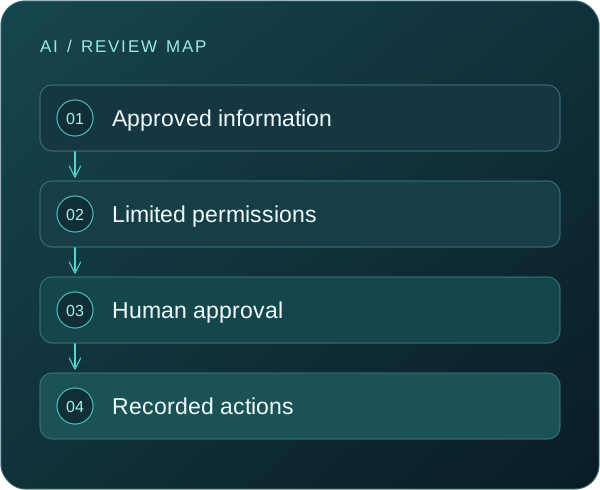
Enforce the boundary
outside the conversation.
Instructions can guide behavior, but they do not replace permissions in the connected system. Untrusted documents, messages or web content may influence a model’s output. The workflow should remain constrained even when the model receives misleading material.
Separate the ability to suggest an action from the authority to execute it. Review retrieval access, tool permissions, transaction limits and the records needed to understand what happened.
Tick items after review. Keep the supporting evidence in your own approved system. Selections are not sent to us and reset on refresh.
Purpose & information
Make the use case visible before evaluating its controls. Include AI features inside existing applications, not only separate subscriptions.
The tool, account plan, business owner and use case are recorded.
Approved and unapproved AI use has been discussed with the team.
The information entered and connected sources are identified.
Retention, training-use terms and sharing settings are reviewed.
Sensitive information boundaries and approved alternatives are clear.
Permissions & actions
Understand which identity the system uses and what that identity can reach. Test the boundary with realistic roles and tasks.
Connected repositories respect the intended user permissions.
Integrations use the minimum necessary permissions.
Consequential actions require an appropriate approval step.
The application enforces authorization independently of model output.
A tested stop, revoke and recovery procedure has an owner.
People & oversight
People need a usable route for checking outputs and reporting mistakes. A policy should explain the everyday decision, not just prohibit risk.
Outputs are reviewed before important business use.
Staff know how to verify unusual payment or access requests.
The team can report accidental disclosure or unexpected behavior.
Evaluation includes misleading inputs and restricted information.
Changes to tools, models and permissions trigger a review.
ILLUSTRATIVE REVIEW SCENARIOS
Make the test
look like real work.
A client document in a personal AI account
Ask why the employee needed the tool, what information was entered and which account terms applied. Provide an approved route and an incident-reporting process. Do not assume deleting a conversation resolves every disclosure question.
A persuasive request to change payment details
A familiar voice or well-written message does not establish authority. Use a contact route established independently of the request and the normal approval process before a sensitive change.
An internal assistant returns restricted material
Check source permissions, indexing and retrieval behavior across user roles. Remove or contain inappropriate access through the platform’s controls and investigate the information boundary.
An agent follows instructions inside a document
Treat source material as untrusted. The agent should not gain authority because a document tells it to act. Review tool limits, approval requirements and the ability to inspect or stop the workflow.
AFTER THE CHECKLIST
Make the exceptions
visible and owned.
Record the gaps that matter to the use case. Some may require a configuration change; others may require a different process, vendor clarification or a narrower pilot. Give each decision an owner and review date.
Expand only after the people responsible for the workflow understand the remaining uncertainty. Revisit the review when a new connector, feature or action changes what the tool can access or do.
For each tool, record the intended task, permitted information and actions, test results, unresolved questions and the person who can authorize the next stage.
QUESTIONS THAT MATTER
A clearer answer.
A better next step.
Does an enterprise AI plan remove the risk?
An enterprise plan may offer different controls or terms, but the exact configuration, information flows and permissions still need review. Evaluate the specific workflow and account arrangement rather than relying on the product label.
Can we rely on instructions to prevent data disclosure?
Instructions are one part of the workflow. Access controls, retrieval boundaries, data handling and independent authorization must also be considered. Test what happens when the tool receives misleading or conflicting material.
Should we ban every AI tool?
A workable policy should define permitted uses, information boundaries and an approval route. The appropriate restriction depends on the use case and risk. Staff need an approved way to complete legitimate work.
Are deepfakes the only AI-enabled threat?
No. AI can assist convincing messages, impersonation and other attacker activity. Your own use of AI can also introduce data and permission risks. Review both the external threat and the internal workflow.
Does this checklist certify an AI system?
No. It helps organize a review. It does not inspect a model, validate vendor claims or establish compliance. Formal assurance requires an agreed method, evidence and appropriate expertise.
How should we handle a new AI integration?
Record its purpose, data sources, permissions and owner before enabling it. Test a limited scope, establish oversight and confirm how to stop or revoke access. Review again when the integration changes.
Further reference: NIST AI Risk Management Framework. This resource is practical guidance, not a certification or a substitute for an assessment of your environment.
TURN INFORMATION INTO ACTION
Bring your questions.
Leave with a clearer direction.
Tell us what you want to protect, where the uncertainty is and who needs to be involved. We will discuss the scope and practical next steps with you.